
Home / All features / Game statistics
Game statistics: shots, speed and calories
The smart court turns a match into numbers: which shots were played, how fast the ball flew, how far the player ran and how much effort the game took. All in the match card in the app, with the week's moments in one reel. The video shows a real court 4 rally with the ball line and speed.
What it is and why
Amateurs care not only about winning or losing but about how they played: how many smashes, the fastest shot, how my game differs from my partner's. On a smart court these numbers come by themselves.
Numbers are honestly labelled: ball speed is a camera measurement, calories are an estimate. A club coach can check and correct shot types, so shot statistics get more accurate over time.
What it does
Game statistics
- Shots by type: serve, return, volley, groundstroke, overhead, smash, lob
- Shot and ball speed from the cameras
- Glass hits from sensors on the court glass
- A calorie estimate per match and a reel of the week's moments
A smart court: cameras, cameras, a system.
How it works
How it works
- Cameras see the rally
Cameras build the ball flight in 3D, cameras the players' poses.
- Shots by type
From ball flight and pose the system tells the shot type: serve, return, volley, groundstroke, overhead, smash, lob.
- Glass
Sensors on the court glass hear the ball hitting the glass.
- Movement and calories
Distance and body movement from cameras; calories estimated from them and profile weight.
- In the app
After the match — numbers in the match card, best shot in the profile, Video of the week.
- What wins points
A pair's rally patterns for a match and a period: which shots and positions win and lose points; See all such points opens a reel of those rallies.
- Shot map
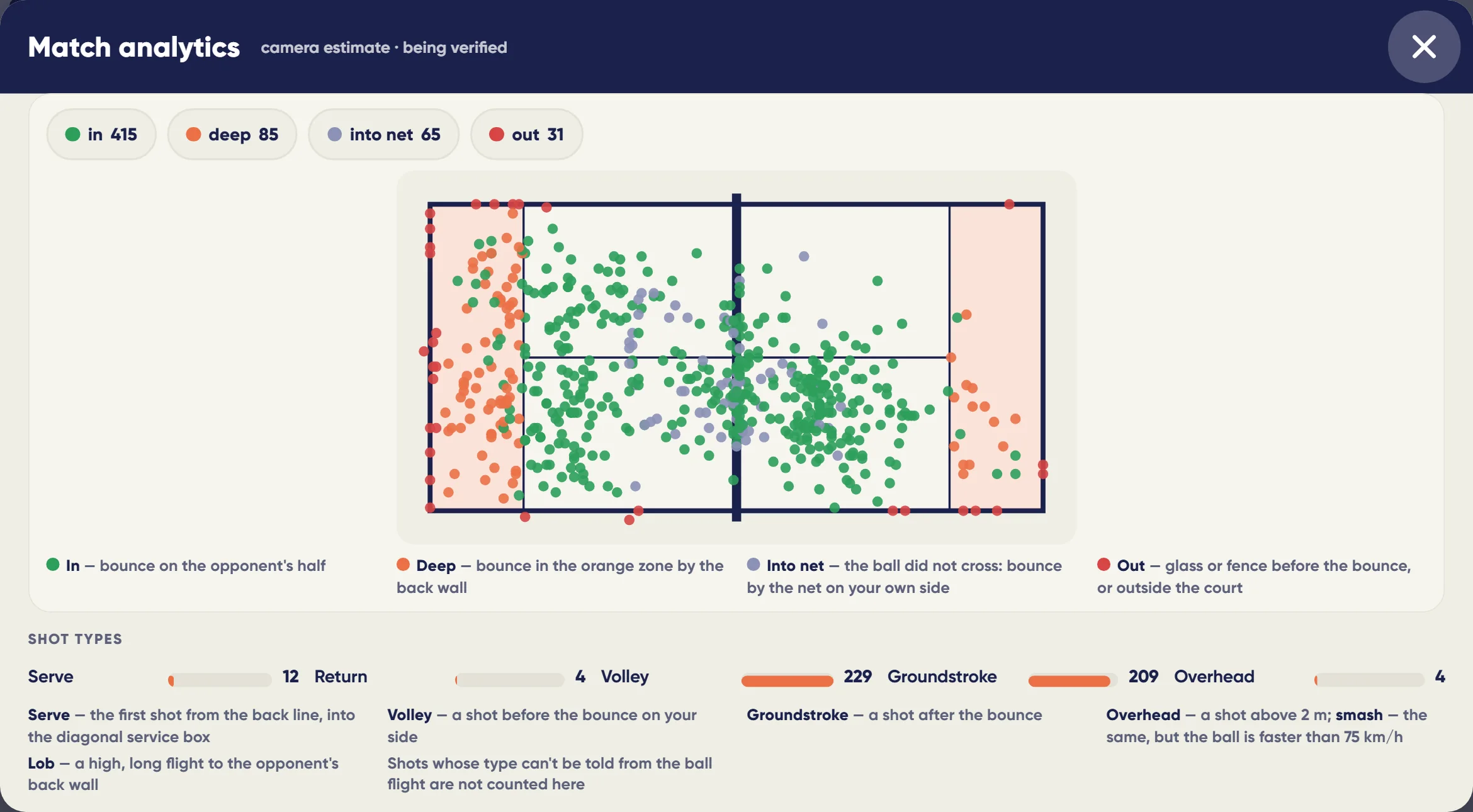
Where a player's shots land: accuracy, depth, winners and errors — per match and per period.
- Shots as CSV
A player exports their shots for a match or a period to a spreadsheet; a coach — their student's shots; the club — per player of a match.
What you will see
What you will see
Player in the app
Shots by type, shot speed, distance, calories (estimate), best shot, Video of the week.
Coach
Students' statistics; checking and correcting shot types.
Club
A reason to play on the smart court.
In detail
Game statistics
Shot statistics
Match shots by type: serve, return, volley, groundstroke, overhead, smash and lob — from the ball flight and player poses. A club coach can check and correct the shot type.
Shot and ball speed
Ball speed after the shot from the cameras, in km/h, and the best shot of the match in the profile.
Glass hits: sensors
Sensors on the court glass hear the ball hitting the glass, which helps settle disputed balls near the walls.
Calories per match (estimate)
An estimate from playing time, distance and body movement from 3D poses plus the weight in the profile. Without a weight — for 75 kg.
Week reel
Moments from your matches over the last 7 days in one selection: the best clips of each match first, then the rest.
Player comparison, head-to-head and duel
You can compare yourself with an opponent: rating, matches played, win rate, fastest ball, form over 30 days and head-to-head meetings. In Duel the system suggests opponents with the closest-to-50:50 chances and a similar style of play; once a challenge is accepted, a chat and a booking open.
What wins points
The match's points are broken down into rally patterns: who hit last, with which shot, from which zone, a long or a short rally. The pair sees the three patterns that win and lose the most, for the match and for a period, each with Watch all such points.
Shot map, accuracy and depth
Your shots shows the player's shots for a match, 30 or 90 days or a year: a map on the court, accuracy, depth, winners and errors. With fewer than 20 shots the screen says so — too few shots. Your own shots can be downloaded as a CSV file that opens in Excel.
Serves
A separate Serves tab: how many first serves went in, how many second serves, the share of double faults. Where the serve goes — to the T, to the body or to the side glass. How the opponents return it — low or with a lob, and where the return goes: to the middle, down the line or cross-court.
Attack and defence, glass and lobs
The Attack and defence tab shows what share of shots a player hit in attack (volley, overhead, smash) and what share in defence (after the bounce, lob, off the glass). Separately: shots off the back and side glass, and lobs — long and short, to the middle and to the glass. They show how varied the lobs are.
Open spaces and shot depth
How many shots the player sent into open space — where the ball bounced more than three metres from both opponents. And how deep they hit: next to the deep share there is the average distance from the bounce to the opponent's back wall, in metres.
Points for each player
How many points a player won with their own shot and how many they gave away with their own error — not only for the pair, but for each of the four. If in a match the system is not sure which partner hit, the points are shown for the pair instead of being made up.
Last 3, 5 and 10 games
In the season summary the trend can be viewed over the last 3, 5 or 10 games: rating, ball speed and distance covered — the average over those games and how much it rose or fell against the same number of games before them.
Limits, honestly
Limits, honestly
- Ball speed is a camera measurement; a radar comparison has not been published yet.
- Shot type is an automatic estimate; a coach can correct it.
- Calories are an estimate; without profile weight it assumes 75 kg.
Who it helps
Who it helps
Players
Your game in numbers: shots, speed, distance.
Coaches
Objective statistics of students by match.
Clubs
Value in every smart-court match.
API
API
The same data in your systems through the open API.
GET /v1/me/achievements # achievements and best numbers of the player
Questions and answers
Questions and answers
How accurate is ball speed?
It is a camera measurement; shown as a measurement, not a reference.
How are calories computed?
From play time, distance, body movement and profile weight; without weight — for 75 kg. An estimate.
What is Video of the week?
A reel of moments from your matches over 7 days.
Which shot types are distinguished?
Serve, return, volley, groundstroke, overhead, smash, lob.
Can a shot type be corrected?
Yes, a club coach checks and corrects it.
Are racket sensors needed?
No, only cameras and sensors on the court glass.
Where is my best shot?
In the player profile.
When do statistics appear?
After the match, in the match card.
Can I export my shots?
Yes, as a CSV file from the profile or the match card: type, side, zone, speed, shot outcome.
More features
Match insights on the court terminal
The game is over — the review is already on the screen by the court: how the chances of winning changed,…
Heatmap and player movement
Court cameras follow each of the four players through the whole match. After the game the app shows a heat…
Highlights
The system finds the best rallies of the match by itself and cuts them from every camera — with a score…
Want this court in your club?
We'll show it live and size it for your club.